Gartner’s How to Achieve the Minimum Viable AI Governance


Blog
How to Prevent Horizontal Privilege Escalation on Windows Endpoints

Active Directory & Identity Security
Endpoint Hardening
Group Policy & Intune

In my previous article I wrote about the importance of monitoring all endpoints in the organization for the existence of cached credentials. In this post, I'm going to explain what you can do to quickly close your exposure when such caching is found.
If you are locally storing credentials, hackers can easily reveal the hash using Mimikatz. Then, the attacker can use the “pass the hash” technique to gain access to remote machines and services.
Grinding the Attack to a Stop
Here' how the attack path breaks down and what you can do to stop it:
- Mimikatz and similar tools are only able to access the credential hashes when run as a privileged user such as a local administrator.
Mitigation action: minimize privileged user access where possible.
- Microsoft desktops and servers have a configuration known as the Debug Privilege. This is a security policy setting that allows users to attach a debugger to a process or to the kernel.
For example, with debug privilege, one can silently remove all the security agents installed on a device, without raising any alert. On many versions of Windows, including Windows 10, Debug Privilege is assigned to the Built-in Administrators group by default!
That is a great power in the hands of whoever wants to spread their ransomware in your organization.
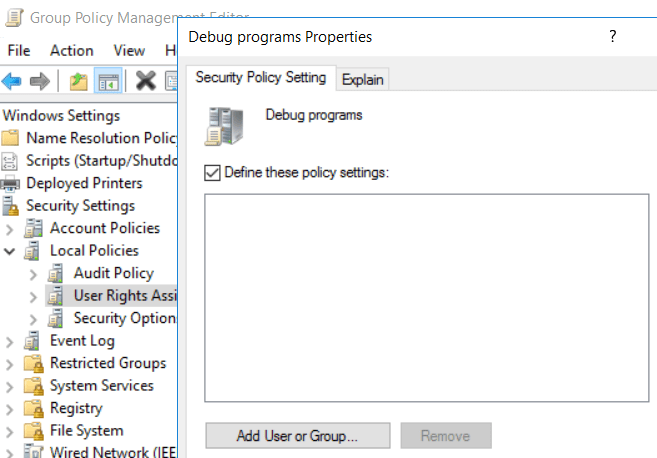
Mitigation action: Apply GPO and revoke the debug privilege from all users:
Group Policy Management Editor → Windows Settings → Security Settings → Local Policies → User Rights Assignment → Debug programs → Define these policy settings → Leave the box empty and press OK
Think Like a Hacker to Beat the Hacker
When an attacker gains a privilege escalation on one of your endpoints, it’s already bad news. They will then try to leverage that power for making a lateral movement inside your network and take over additional workstations and servers.
Still, by applying the right practices on your endpoints, the attacker’s chances are slim.
Remedio always monitors and reports on all endpoints in your organization. We can tell if the debug privilege is not secured properly including whether the policy has also been successfully applied.

FAQ
What is the Windows Debug Programs privilege, and why is it dangerous?
The Debug Programs privilege allows a user or process to attach a debugger to other processes, including highly privileged system processes. If granted unnecessarily, attackers who obtain local administrator access can abuse this privilege to extract credentials from memory, disable security controls, or escalate an attack. Restricting this permission significantly reduces the options available after an initial compromise.
How does removing the Debug Programs privilege help prevent lateral movement?
Many lateral movement techniques rely on stealing credentials from compromised endpoints before accessing additional systems. Preventing unauthorized users from debugging protected processes makes it more difficult for attackers to harvest password hashes and cached credentials used in pass-the-hash and related attacks.
Should every endpoint have the Debug Programs privilege disabled?
For most enterprise workstations and servers, the privilege should be restricted to trusted administrators or specialized applications with a documented operational requirement. Applying least privilege removes unnecessary attack paths while preserving legitimate administrative functions.
Can Group Policy enforce this security setting across the enterprise?
Yes. Organizations can configure the Debug Programs user right centrally through Group Policy so that only approved accounts receive the privilege. Central enforcement also helps maintain consistency as new devices are deployed and existing systems change.
Why is configuring the policy once not enough?
Configuration drift can weaken an approved security baseline over time. Administrative changes, software installations, local modifications, and policy conflicts may reintroduce risky permissions. Continuous monitoring and automated remediation help ensure the setting remains correctly enforced across the endpoint estate.
Does restricting the Debug Programs privilege affect legitimate administration?
In most environments, routine IT administration does not require this privilege. Before enforcing the restriction, organizations should identify applications, development workflows, or support tools that genuinely depend on debugging rights and create tightly controlled exceptions where necessary.
Is restricting the Debug Programs privilege enough to stop ransomware from spreading?
No. This control removes one technique attackers can use after gaining access, but it should be combined with credential protection, secure configuration management, patching, least privilege, segmentation, and continuous monitoring to materially reduce lateral movement risk.
How can organizations verify that every endpoint remains compliant with this policy?
Manual audits are difficult to sustain across large and changing environments. Continuous configuration assessment can identify systems where the Debug Programs privilege has been modified, while automated remediation can restore the approved state before attackers exploit the drift.
About Author