
Gartner’s Top Strategic Technology Trends for 2027


Blog
Java4Shell Vulnerability (CVE-2026-114938): What It Is, Who’s Exposed, and What to Do First

Company & Product News
Zero-Days

A newly disclosed critical flaw in the Java runtime (dubbed Java4Shell and identified by CVE-2026-114938, it) carries a 9.2 CVSS score and enables pre-authentication remote code execution across core enterprise tools like Jira, Keycloak, and Jenkins.
Because the bug lives inside the JVM itself rather than a third-party library, traditional dependency scanners will miss it. Here is how to assess your hardware exposure and lock down your environment immediately.
What Is the Java4Shell Vulnerability?
On November 17, 2026, the security firm Calif disclosed a memory-corruption vulnerability in the Java runtime. The flaw is in an accelerated code path the runtime uses to decode Base64 data on certain processors. A specially crafted Base64 string can make it write past the memory it was given, corrupting other data.
Oracle and the OpenJDK project released fixes the same day.
Why "In the Runtime" Matters
Log4Shell lived in a logging library. Teams could find it by scanning for a dependency and fix it by updating that dependency. The Java4Shell vulnerability is different. The vulnerable code is part of the Java runtime itself, so the question isn't which libraries you use. It's which runtimes you run, on which hardware, and which of your applications decode Base64 from outside input. Base64 is everywhere: in authentication tokens, API payloads, and file uploads.
What's Been Demonstrated
Calif demonstrated remote code execution against default configurations of several widely used enterprise applications. Against Keycloak, Atlassian Jira, Atlassian Confluence, JFrog Artifactory, Jenkins, and PingFederate, it worked before login. Against Apache Kafka, Apache Solr, Elasticsearch, Gerrit, and Spinnaker, it required an authenticated user. It also worked on sample applications built on Apache Struts and Spring Boot.
The researchers have published a proof of concept that triggers the bug, but they are holding back the product-specific exploits for now. There is no known exploitation in the wild, and the vulnerability is not currently in CISA's Known Exploited Vulnerabilities catalog. Several of the affected applications are identity and developer platforms that usually sit in front of everything else, which is why we recommend acting now.
Who's Affected
- Runtimes: OpenJDK 17.0.6 and newer across the 17, 21, 25, and 27 lines.
- Distributions: downstream builds including Eclipse Temurin, Amazon Corretto, Oracle Java SE, Microsoft Build of OpenJDK, Azul Zulu, BellSoft Liberica, SAP SapMachine, and Red Hat OpenJDK.
- Java 8: Enterprise Performance Pack builds.
- Hardware: x86-64 CPUs with AVX-512 VBMI (recent Intel Xeon generations from Ice Lake onward, AMD Zen 4 and newer). ARM64 systems are reported as not affected.
- Applications: any Java application that decodes externally supplied Base64 data.
Why Patching Java Is Harder Than It Looks
- The exposed apps are the critical ones. Restarting Jira, Confluence, Jenkins, or your identity provider takes a change window.
- Bundled Java waits on vendors. Many commercial products ship their own runtime, and only the vendor can update it.
- One server, many Javas. A single host can run several Java versions for different applications and agents.
- Exposure depends on hardware. Two servers on the same Java version can carry different risk, depending on their CPU.
What To Do Now
- Inventory every Java runtime, including bundled and container copies, along with its version and the CPU it runs on.
- Upgrade internet-facing systems first, starting with identity, collaboration, and developer tools reachable before login.
- Move to the fixed releases: 17.0.21.1, 21.0.13.1, 25.0.5.1, or 27.0.1.1, or your distribution's equivalent.
- Contact vendors whose products bundle Java, and ask for their fixed build and timeline.
- Mitigate what you can't upgrade yet, and track those systems until the upgrade is done.
How Remedio Helps
Remedio customers see affected devices on a single Java4Shell page, reached directly from an in-platform alert. From there they can do two things.
1. Mitigate
Apply a configuration change that turns off the accelerated Base64 decoding the attack depends on. It requires no Java upgrade, can be rolled back with a click, and keeps mitigated devices tracked separately from fully patched ones. Base64 encoding and decoding fall back to the normal compiled Java code.
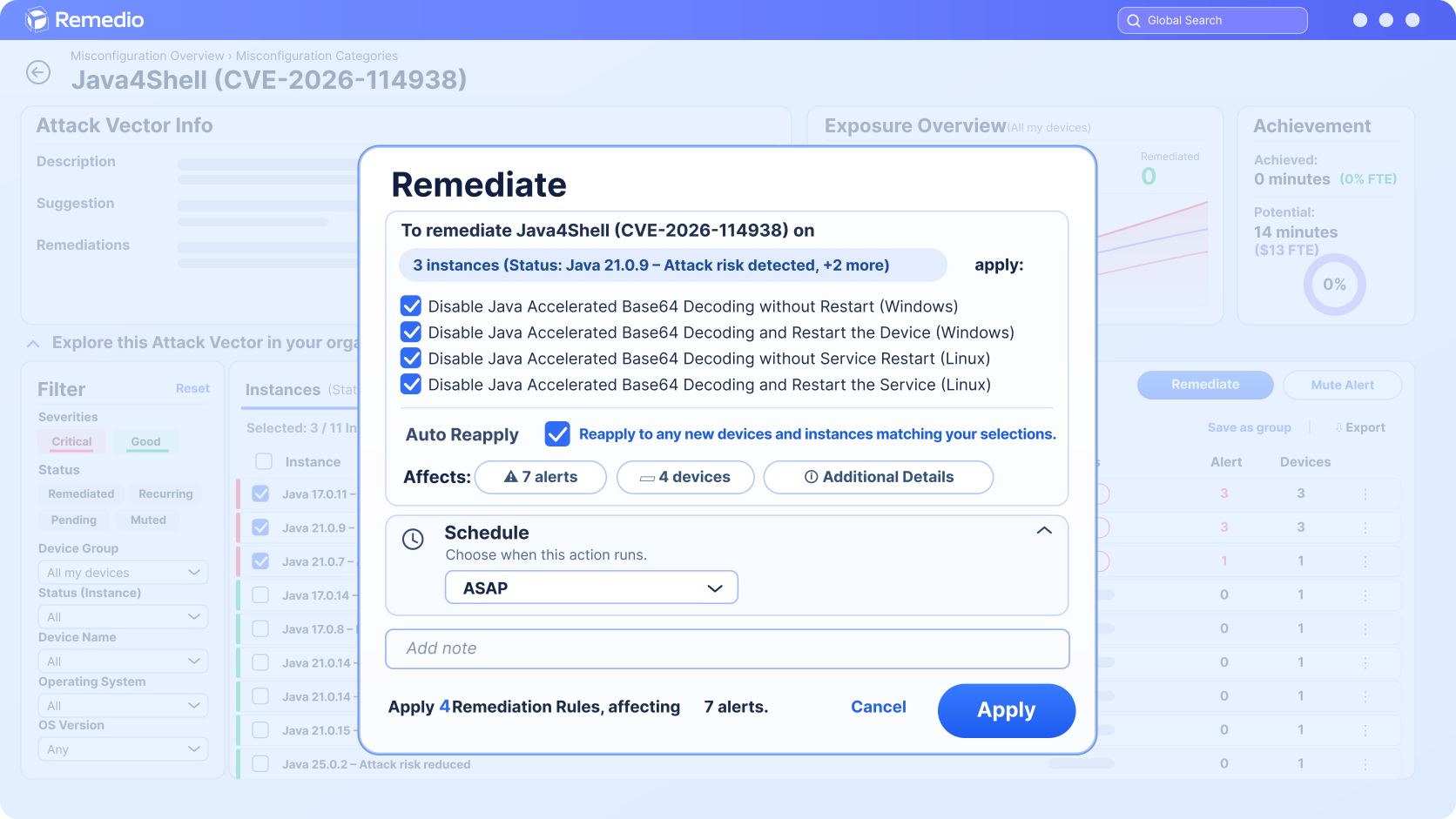
The output is exactly the same, but heavy Base64 work could get slower. That includes JWT/SAML/OIDC token handling, Basic auth, MIME and email,
2. Plan the upgrade
Create a list of affected devices to drive and track the move to fixed releases.
The mitigation reduces exposure. Upgrading to a fixed release remains necessary for complete remediation.

______
References
About Author