Gartner’s How to Achieve the Minimum Viable AI Governance


Blog
Device Lifecycle Management: Why Security Can’t End at Deployment

Autonomous Remediation
Endpoint Hardening

In today’s digital landscape, organizations face relentless cyber threats, with ransomware incidents posing a significant risk.
Microsoft reports that 80% of ransomware is attributed to device misconfigurations, highlighting the urgency of robust device configuration management.
Device configuration management ensures IT devices are securely configured and maintained, reducing susceptibility to cyber-attacks. It involves systematic configuration, monitoring, and adherence to industry best practices.
This challenge is composed across PCs/laptops and Servers, with typical operating systems of Windows, Linux, and MacOS.
Stakeholders
Effective device configuration management synergizes stakeholders across Infrastructure, IT and security domains:
Infrastructure
Implement and maintain hardware/software components, establish baseline configurations, and deploy updates to minimize disruptions.
IT
Manage IT resources, ensuring secure provisioning, configuration, and monitoring of devices.
Security
Define security policies, conduct risk assessments, and enforce security controls to mitigate risks.
They utilize configuration management tools for vulnerability monitoring and compliance enforcement.
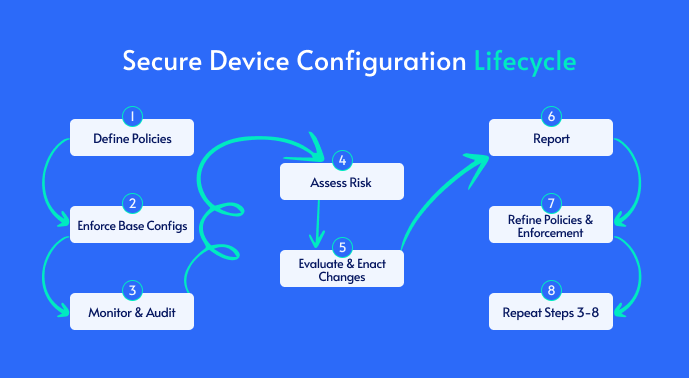
Key Stages of the Device Configuration Security Lifecycle
Define security policy
Establish and enforce security policies using mechanisms like Active Directory (AD), Group Policy Objects (GPO) and Intune. Ensure adherence to gold standard builds and validate existing policies.
Baseline configuration
Compare configurations against industry standards such as CIS and NIST. Continuously monitor compliance and highlight areas misaligned with the framework.
Continuous monitoring
Detect device misconfigurations by operating systems and provide insights into severity and impact using tools like Remedio.
Risk Impact assessment
Assess the impact of making a configuration change on operational impact.
Change advisory board integration
Seamlessly integrate with ITSM platforms like ServiceNow for streamlined workflow management.
Remediation
Close the security gap effectively and concisely without an impact on operations, with confidence.
Reporting
Enable reporting on risk mitigation and resource alignment to determine the cost of ownership.
Regular audits and assessments
Provide continuous monitoring and curated reporting for ongoing security posture maturity.
Adapt and improve
Ability to ensure all learnings and detections are eliminated and evolve into a maturing life cycle.
Streamlining the Configuration Security Lifecycle
Remedio, a robust device configuration management tool, plays a pivotal role in automating and streamlining the secure device configuration life cycle.
Validation and monitoring
Define security policy
Typically, within IT domains – Security policies are established and enforced through mechanisms such as Active Directory (AD), Group Policy Objects (GPO), and Intune.

Remedio can validate the deployment of these policies; furthermore, Remedio can scan gold builds for any misconfiguration and ensure exploitable misconfigurations are detected.
Baseline configuration
Typically, within IT domains – Remedio compares configurations against industry standards such as CIS and NIST.
Unlike most point-in-time scanning solutions, Remedio continuously complies by highlighting areas that are not aligned with the framework in question.
Continuous monitoring
Typically, within the Security Domain – Remedio offers continuous monitoring, detecting hundreds of misconfigurations across Windows, Linux, and macOS systems.
It provides insights into affected devices, the severity of issues, and the potential impact of the flagged misconfigurations mapped against the MITRE ATT&CK Framework, detailing tactics and real-life examples amongst threat actors targeting the protocol in question – e.g, SolarWinds abusing debugged privileges and network access, BLACK BASTA are using the “Print Nightmare” exploits in the print spooler service for privilege escalation and remote code execution.
Remediation and reporting
Risk impact assessment
Typically, in the Infrastructure Sec Ops domain – Utilizing a proactive “know-before-you-go” approach, Remedio assesses the dependency of devices on specific protocols, ensuring minimal impact. It includes a rollback feature to revert changes if necessary.
Providing insights into the severity of the misconfiguration, tactics, actors, and how they are exploiting the protocol in question.
Change advisory board integration
Typically, IT Infrastructure security domain – Remedio seamlessly integrates with IT Service Management (ITSM) platforms like ServiceNow for streamlined workflow management.
Remediation
Typically, Infrastructure, Security EUC domain, Desktop, Server Team.
- Automatic Zero-Impact Remediation: By determining the device depending on the protocol in question and reading the usage logs, Remedio determines potential impacts. For instance, in the case of the Print Nightmare vulnerability, if printing activity has been absent for a set period, hardening can proceed without an impact with one click!
- Auto Re-Apply Remediation: Offers the option to automatically reapply authorized hardening configurations when new devices are added, or existing ones become misconfigured again.
- Rollback of Remediations: Provides a quick method to revert to previous hardening configurations, should there be an impact.
- Scheduled Remediation: Allows administrators to decide when to implement remediation actions within designated maintenance windows.
- Grouped Devices and RBAC: The ability to manage device groups, determining who from each department can do what, via RBAC, and be able to manage devices by groupings for detection and remediation.
- Reduce Meantime to Remediation: Remedio’s architecture ensures organizations can limit the window of opportunity for threat actors – reducing the meantime to remediation to less than 60 minutes, allowing one-click remediation for hundreds/thousands of devices at once.
- Attack Path Curation: Remedio will provide a narrative as to which tactic and threat actors the action will help bolster mitigation against
Reporting
Typically, C-Level – Remedio enables reporting of the meantime to mitigate risks and the proportional effort expended in closing these gaps. Remedio quantifies cost savings achieved through automating the process, compared to manual efforts.
Regular audit and assessment
In contrast to traditional point-in-time pen tests and VA scanning, Remedio offers continuous monitoring and curated reporting, ensuring ongoing security
posture evaluation.
Adapt and improve
Remedio offers the option for auto reapply of remediations to maintain authorized hardened configurations as devices evolve or encounter misconfigurations.
By incorporating Remedio into the device configuration management process, organizations can enhance their security posture, mitigate risks, and ensure compliance with industry standards.
Automate Configuration Assessment for Stronger Security
Automating configuration assessment is a critical step toward maintaining a robust security posture in today’s complex IT environments. Manual processes are time-consuming, error-prone, and unable to keep pace with evolving threats and compliance demands. By leveraging Remedio’s automated approach, organizations gain continuous visibility into device configurations across Windows, Linux, and macOS systems, ensuring that security policies and baseline standards are consistently enforced.
This proactive method reduces the risk of misconfigurations that can lead to costly breaches, ransomware attacks, or compliance failures. It empowers security and IT teams to identify vulnerabilities faster and remediate them before they escalate. Moreover, automation supports scalability without adding operational overhead.
Ultimately, automating configuration assessment streamlines the entire device configuration lifecycle, from defining security policies to auditing compliance, and helps businesses stay ahead of risks and maintain regulatory requirements effortlessly. Remedio's solution transforms configuration management from a reactive challenge into a strategic advantage, enabling organizations to safeguard their infrastructure with confidence.


FAQ
What is a device configuration security lifecycle?
A device configuration security lifecycle is the continuous process of defining security policies, establishing secure baseline configurations, monitoring for configuration drift, assessing risk, remediating issues, validating changes, reporting on compliance, and continuously improving security throughout a device's operational life.
Why is automated configuration assessment better than manual reviews?
Manual assessments provide only periodic visibility and often struggle to keep pace with infrastructure changes. Automated configuration assessment continuously evaluates devices against security baselines, identifies misconfigurations as they occur, and helps organizations maintain compliance while reducing the operational effort required for ongoing security management.
Which security frameworks can be used for configuration assessments?
Organizations commonly assess device configurations against established security frameworks such as the Center for Internet Security (CIS) Benchmarks and the NIST Cybersecurity Framework. These standards provide recommended secure configuration baselines that help reduce attack surface and support regulatory compliance.
What is configuration drift, and why is it a security concern?
Configuration drift occurs when devices gradually deviate from their approved security baseline because of software updates, administrative changes, new applications, or operational exceptions. Left unchecked, drift can introduce exploitable security gaps, reduce compliance, and create inconsistencies across enterprise environments.
Can automated configuration management reduce operational risk during remediation?
Yes. Modern configuration management platforms can evaluate dependencies before applying changes, schedule remediation during maintenance windows, support staged deployments, and provide rollback capabilities if unexpected issues occur. These capabilities help minimize business disruption while improving security.
Which teams are typically responsible for device configuration security?
Device configuration security is typically a shared responsibility across infrastructure, IT operations, endpoint management, and cybersecurity teams. Infrastructure teams manage platforms and deployment, IT oversees provisioning and operations, and security teams define policies, assess risk, and validate compliance.
How does continuous configuration monitoring improve security?
Continuous monitoring identifies configuration changes shortly after they occur instead of waiting for scheduled audits. This allows security teams to detect new exposures faster, prioritize remediation based on risk, and maintain consistent security posture as enterprise environments evolve.
What are the business benefits of automating device configuration management?
Automating device configuration management helps reduce security risk, improve compliance, shorten remediation timelines, increase operational consistency, reduce manual administrative effort, and support scalable management of Windows, Linux, and macOS environments without significantly increasing staffing requirements.
About Author