Gartner’s How to Achieve the Minimum Viable AI Governance


Blog
Preventing Lateral Movement: A Tactical Guide for Cybersecurity Teams

Endpoint Hardening
Patch Management
Risk Management
Security Misconfigurations

The initial compromise gets the headlines. What the attacker can reach afterward determines the damage.
A compromised workstation is a security incident. A compromised workstation with reusable administrative credentials, access to management servers, and permission to execute commands remotely can become an enterprise-wide crisis.
Attackers rarely need every defense to fail. They need a workable combination of access, privileges, and vulnerable systems. Often, the necessary ingredients are already present in the environment, accumulated through years of legitimate operational decisions.
The 2024 Change Healthcare attack illustrates the consequences. Attackers used compromised credentials to access a Citrix remote-access portal without multi-factor authentication. They subsequently moved through the environment, stole sensitive information, and deployed ransomware nine days after the initial intrusion.
Healthcare claims, pharmacy services, and payment processing were disrupted across the United States. By July 2025, approximately 192.7 million individuals had been identified as affected.
Nine days might sound like ample time to intervene. In many intrusions, the window is considerably smaller.
The CrowdStrike 2026 Global Threat Report puts average observed eCrime breakout time in 2025 at 29 minutes, with the fastest recorded at just 27 seconds. Breakout time measures how quickly an attacker moves from initial access to another system.
Defenders cannot rely on detecting a breach and then scrambling to close every exposed path.
Lateral movement resistance has to exist before the attacker arrives.
The Three Conditions That Make Lateral Movement Possible
Lateral movement is commonly described as an attacker moving from system to system. That description captures the activity but says little about the conditions that allow it.
An attacker typically needs some combination of three things:
- Reachability
- Authority
- Access meets execution
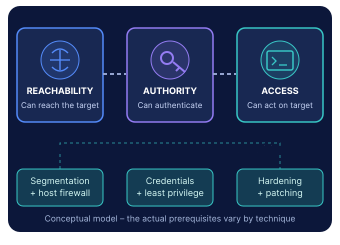
Reachability refers to the open routes connecting one system to another; whether through an unrestricted management port, an allowed network connection, or a trusted administrative relationship.
Authority refers to the credentials, session tokens, account privileges, or an exploitable weakness that permits access.
Access meets execution is what happens when an actor capitalizes on the ability to do something useful on a target. That can be running a command, retrieving data, establishing persistence, or compromising another identity.
These are not rigid sequential steps. An unauthenticated remote exploit can bypass the need for legitimate credentials. A stolen Kerberos ticket may provide access without a fresh login.
But the model exposes a fundamental principle:
Attackers can be stopped by removing a condition their chosen path requires.
A segmented network might prevent a workstation from reaching a database server directly. Yet if that workstation can access a management server that legitimately administers the database, the attacker may still have a route.
Segmentation defines the boundaries. Configuration and identity controls determine what an attacker can do within and across them.
The uncomfortable detail is that attackers often use the same tools administrators rely on every day.
PowerShell, WMI, WinRM, PsExec, and RDP have legitimate purposes. An attacker operating with valid credentials can exploit that legitimacy, making malicious activity harder to distinguish from routine administration.
Simply blocking one utility rarely solves the underlying problem. Another execution method may remain available.
The 2017 NotPetya attack provides a particularly instructive example.
The malware entered organizations through a compromised software update mechanism associated with M.E.Doc. It then propagated using two methods: exploitation of SMBv1 vulnerabilities together with the theft and reuse of authentication material.
Across those two attack paths, Microsoft found that credential impersonation accounted for more propagation than exploitation of SMB vulnerabilities in the environments it investigated.
In one organization, 97% of endpoints were patched for SMBv1, yet NotPetya still spread enterprise-wide because attackers could reuse compromised credentials.
This is why counting corrected vulnerabilities cannot, by itself, establish resistance to lateral movement.
What actually matters for attackers - and by extension for defenders - is the usable attack path, not unpatched CVEs.
The Configuration Problem Hiding Inside Lateral Movement
Most enterprises already have policies requiring credential protection, restricted administration, secure authentication protocols, and hardened operating systems.
A security standard may require SMB signing. Group Policy may prescribe it. Intune may reinforce the requirement.
Yet an individual device might still have a conflicting configuration, failed policy application, undocumented exception, or legacy dependency that prevents enforcement.
Policy is a promise. Effective configuration is the evidence.
This is especially important in hybrid estates where Active Directory, GPOs, Intune, local administrators, third-party management software, and application installers can all influence a device's security state.
CISA's red team found the path hiding in legitimate trust
A CISA red-team assessment of a large organization revealed just how damaging these relationships can become.
The environment had network segmentation and geographically separated sites. Yet the red team identified ordinary user accounts with administrative access to critical servers and found 52 recently active Active Directory hosts configured with unconstrained Kerberos delegation.
After compromising a workstation, the team reached a SharePoint server with unconstrained delegation enabled. They then exploited that configuration to obtain a domain controller's Kerberos ticket-granting ticket, ultimately acquiring the means to impersonate privileged accounts.
The chain did not require every server to be vulnerable. Excessive permissions and one consequential delegation weakness created a route to much broader authority.
CISA also documented a boundary that held: multi-factor authentication prevented access to one sensitive business system.
The lesson is nuanced. Segmentation and MFA mattered. So did the configuration weaknesses that allowed the attackers to move around other controls.
For defenders, this translates into concrete takeaways:
- Inventory unconstrained delegation
- Audit administrative memberships
- Identify privileged identities authenticating to lower-trust hosts
- Correct relationships that no longer serve an operational need
Not All Compromised Systems Are Equally Dangerous
A misconfigured workstation and a misconfigured management server may produce identical security findings. Yet their consequences can be radically different.
The workstation may expose one user or a small set of local resources. The management server might hold privileged credentials, administer thousands of endpoints, or connect otherwise isolated network segments. Compromising it can multiply an attacker's reach.
The risk isn't just what an attacker can do to a system. It's what that system can do to everything else.
This changes remediation priorities. Domain controllers, management servers, privileged jump hosts, backup infrastructure, and systems with broad administrative authority deserve particular scrutiny. An apparently moderate configuration weakness on one of these systems may be more consequential than a critical finding on an isolated endpoint.
Security teams therefore must assess not only vulnerability severity and configuration compliance, but also the downstream access a compromised system could confer. That means examining administrative relationships, reachable systems, privileged credentials, and dependencies when deciding what to fix first.
Secure the protocols, not merely the policies
Authentication relay is another example of a familiar weakness with precise technical remedies.
For SMB, security teams should distinguish between signing being enabled and signing being required. In SMB2 and later, the effective RequireSecuritySignature setting determines whether unsigned communication is rejected.
LDAP signing and channel binding address different weaknesses in directory authentication. Organizations running Active Directory should assess both.
That means checking actual client behavior before enforcement. Microsoft documents LDAP event 2889 for identifying unsigned binds when the relevant diagnostic logging is enabled. Supported Windows Server versions also provide channel-binding audit events, including 3074 and 3075.
Requiring stronger authentication can expose an incompatible directory client or legacy application. That compatibility issue should be discovered through auditing and testing, not during a production outage.
The same discipline applies to remote access. RDP, WinRM, and SMB should be reachable only where administration requires them. Host firewalls, managed jump infrastructure, and appropriately scoped privileges can shrink the available routes.
An attacker with stolen credentials has far fewer options when those credentials cannot be used across an unrestricted population of devices.
Attackers can also create the misconfiguration
Configuration drift is usually associated with administrative mistakes. Sometimes the change is deliberate and hostile.
Microsoft documented a PARINACOTA ransomware intrusion in which attackers entered through RDP brute force and used stolen credentials to access additional servers.
When they encountered a server without RDP enabled, they used WMI and PsExec to enable remote desktop connections and modified its firewall configuration with netsh. That opened the route they needed.
They subsequently used the compromised infrastructure to deploy ransomware across much of the organization's server estate.
That's what happens when adversary's find the configuration drift they need.
A control that was secure yesterday can become permissive today because someone with sufficient authority changed it.
Why Known Weaknesses Survive for Months
There's an obvious contradiction in enterprise security. Teams know which settings are unsafe. They have the benchmarks, scanner findings, and hardening guides to prove it. Yet the same weaknesses keep appearing in assessments.
The explanation is often found outside the security team's tooling.
An infrastructure engineer knows that disabling an old authentication protocol might break a revenue-critical application. A manufacturing operations team cannot accept a configuration change that unexpectedly stops production. A hospital cannot tolerate an authentication failure that interrupts clinical workflows.
So the change gets deferred.
A temporary exception is approved. Another application is added to the exclusion list. The issue remains open until the next maintenance window, which slips because another dependency emerges.
A security control that cannot be safely deployed is a control the attacker may never have to defeat.
Consider an organization preparing to enforce LDAP channel binding on its domain controllers.
The insecure configuration needs to be corrected, but a blanket change could disrupt applications that rely on older authentication behavior.
A controlled approach begins with audit data, identifies incompatible clients, and separates systems that can be corrected immediately from those requiring application changes or exceptions.
That's the bare minimum to safely implement changes and, unfortunately, it can be a time-consuming and difficult process. Which is precisely why automation is so vital.
Manual execution limits the number of changes an organization can reasonably complete. But speed without change control simply trades security risk for operational risk.
The objective is repeatable correction with a tolerable operational blast radius.
How Remedio Removes the Conditions Attackers Exploit
To strengthen your defenses, start by imagining yourself as an attacker already inside the network. Ask yourself: “What do you need to (continue to) own the system?” This is what we mean when we talk about thinking like a hacker. And usually you don't need to think too hard or long to know where to focus.
You'll want to quickly get a handle on:
- What credentials and privileges are exposed
- Network segments without strong isolation controls
- Legacy protocols that could allow easy credential theft or relay attacks
Regardless of how hackers got there – once they're in, they're in. It's very easy for them to maneuver through systems without strong hygiene and move across infrastructure. Ransomware groups achieve lateral movement in an average of 48 minutes, with some cases unfolding in under a minute.
Already under attack, that's liable to put you on the back foot. It's hard to hit a moving target and even harden to assert ownership over a system being wormed through by an adversary.
Remedio addresses this part of the lateral movement equation by proactively correcting unsafe device states and keeping them corrected.
Its value is strongest where an attack opportunity depends on endpoint configuration, vulnerable software, or unauthorized applications.
Configuration hardening that reaches the actual device
Remedio Baseline assesses endpoints and servers against approved configuration standards and identifies supported deviations from the required state.
For lateral-movement prevention, relevant controls can include SMB hardening, remote-access configuration, host firewall policies, credential-protection settings, and unnecessary services.
That ensures there's no daylight between policy assignment and effective policy enforcement.
Suppose an organization requires SMB signing across its managed Windows estate. Some endpoints enforce it, others have conflicting settings, and a smaller population remains under compatibility exceptions.
Remedio helps identify supported configuration gaps and apply approved corrections to eligible devices, with policy controls, validation, and rollback.
When a corrected setting changes again, continuous monitoring can identify the deviation and support authorized restoration.
That makes hardening a maintained condition rather than a successful project from six months ago.
Automated, error-proof patching
Remedio Fortify addresses another part of the attack path: remotely exploitable software.
A vulnerable management server deserves particular attention because its legitimate administrative connections may extend to hundreds or thousands of other systems.
Fortify combines vulnerability assessment with controlled remediation, including dependency intelligence, pre-execution validation, scheduling, staged rollout, post-execution verification, and rollback.
Patch execution remains operator-triggered, keeping authorization with the responsible team.
This ensures a verified correction on the affected asset rather than merely recording the vulnerability or marking the patch ticket complete without validating the field state.
Application control
Conventional application control largely concerns itself with whether software is allowed to execute. But that's only a partial solution. An application blocked from launching may still be installed, along with its services, update mechanisms, vulnerable components, and associated licensing costs.
Blocked software is still software you have to manage.
Remedio Gate goes further. It combines centralized software discovery, policy-based execution controls, and automated uninstallation - giving security and IT teams the ability to remove unauthorized applications.
Unauthorized remote-access tools are more than a software hygiene problem. Every unmanaged remote desktop client, RMM agent, or background service can provide another means of accessing an endpoint, executing commands, or moving deeper into the network. Blocking an application's execution may prevent its immediate use, but it can leave installed components, services, and vulnerabilities in place, potentially available for exploitation or reactivation.
Remedio Gate goes beyond blocking applications to removing potential lateral-movement enablers from the fleet. It centrally discovers unapproved, unused, or vulnerable software, enforces execution policies, and uninstalls unwanted applications across managed endpoints.
Instead of leaving dormant remote-access utilities scattered across thousands of devices, security teams can eliminate those installations through a coordinated, policy-driven workflow.
Consider an unapproved remote-support agent installed on hundreds of workstations. Even if employees no longer use it, the software may retain background services, remote connectivity, or vulnerabilities that attackers could exploit after gaining an initial foothold. Centrally uninstalling it removes an unnecessary remote-access mechanism and reduces the number of endpoints that could serve as stepping stones toward critical infrastructure.
This makes Gate particularly valuable against shadow IT, unauthorized RMM tools, and forgotten remote-access applications. It cannot prevent attackers from abusing legitimate Windows administration tools or compromised credentials, but it eliminates an entire category of unnecessary software-based attack opportunities before those opportunities are exploited.
Blocking stops an application from running. Uninstallation removes the unnecessary access mechanism itself. At enterprise scale, Gate combines both capabilities to reduce the software footprint attackers can potentially exploit for lateral movement.
The Need for Layered Security
Consider a company with 8,000 Windows endpoints, centralized helpdesk operations, several management servers, and business-critical infrastructure.
An attacker compromises a helpdesk workstation through phishing.
The workstation provides access to privileged credentials. Some endpoints allow unnecessarily broad remote administration. A management server also has a remotely exploitable vulnerability.
That leaves an attacker with options.
They might reuse stolen authentication material, abuse legitimate administrative access, or exploit the vulnerable management service. Each route relies on different conditions, and closing only one may leave the others intact.
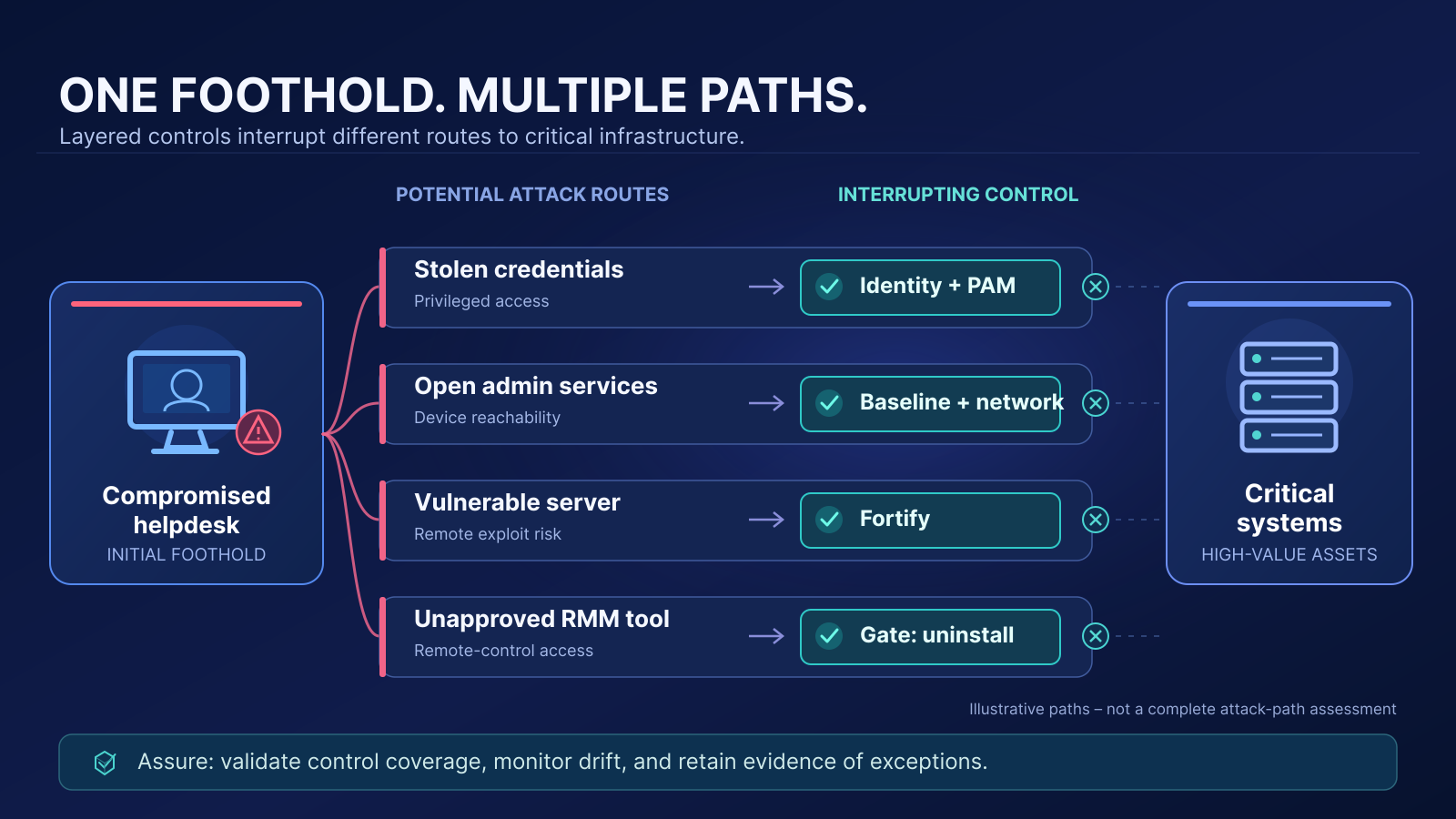
This is why effective defensive needs to be layered.
Identity controls restrict privileged-account reuse. Network policies limit connectivity to administrative systems. Remedio Baseline enforces supported endpoint hardening and remote-service restrictions. Fortify corrects exploitable software weaknesses. Gate limits unauthorized tooling, while Assure maintains evidence of the required controls.
EDR and incident-response capabilities remain responsible for detecting and containing malicious behavior.
The purpose is not to make every system impossible to compromise. It is to prevent one compromised system from inheriting unnecessary access to the rest of the enterprise.
The Best Lateral Movement Defense Is the Path That Never Exists
Attackers have become exceptionally good at turning ordinary enterprise conveniences into routes toward higher-value systems.
Shared administration, persistent exceptions, legacy authentication, permissive remote services, and delayed patching all have operational explanations. Those explanations do not reduce their usefulness to an intruder.
Practical Steps to Preventing Lateral Movement
Preventing lateral movement means reducing those opportunities before someone exploits them, then keeping the necessary controls effective as the environment changes. Toward that end, organizations should take the following actions:
-
Eliminate Unnecessary Protocols
-
Disable SMBv1, NTLM where possible, and enforce Kerberos authentication.
-
Remove legacy services that are no longer needed.
-
Impact on attackers: This breaks the easiest “low-hanging fruit” pathways they rely on for credential theft and relay attacks.
-
-
Harden Active Directory (AD) Configurations
-
Implement tiered admin access to separate privileged accounts.
-
Restrict Kerberos delegation to prevent ticket abuse.
-
Regularly audit Group Policy Object (GPO) permissions.
-
Impact on attackers: Reduces abuse of trust relationships, one of the most common routes for lateral escalation.
-
-
Implement Network Segmentation
-
Enforce Zero Trust principles, ensuring devices only communicate with necessary services.
-
Use firewalls and VLANs to create segmented environments.
-
Deploy endpoint detection tools to monitor anomalous movements between segments.
-
Impact on attackers: Forces attackers to break through multiple barriers instead of roaming a flat network.
-
-
Enforce Least Privilege Access
-
Reduce local administrator accounts and enforce just-in-time (JIT) privilege escalation.
-
Regularly audit user and service account permissions.
-
Impact on attackers: Removes the “all access” master keys that make privilege escalation easy.
-
-
Continuously Monitor & Remediate Configuration Drift
-
Deploy automated security validation tools that detect and correct configuration drift before attackers can do their worst.
-
Bonus: implement Remedio’s auto-reapply function to ensure security settings remain in place even after updates or administrative changes.
-
Impact on attackers: Shuts down new attack paths as quickly as they appear, denying adversaries persistence.
-
Taken together, these steps don’t just harden individual systems. They actually collapse the pathways attackers rely on, turning misconfigurations and weak controls from exploitable weaknesses into reinforced barriers that protect your entire environment.
Remedio helps security and infrastructure teams do that by connecting configuration enforcement, vulnerability remediation, application control, and continuing assurance with controlled corrective action.
The aim is to make known weaknesses both fixable and difficult to reintroduce.


FAQ
How can security teams prioritize lateral-movement risks without a complete attack-path map?
Start with systems that can extend an attacker's authority or reach: domain controllers, management servers, privileged workstations, jump hosts, and backup infrastructure. Examine which administrative credentials, remote services, and trust relationships connect them to other assets. Even an incomplete map can identify high-consequence paths. Prioritize weaknesses based on the access a compromised system could confer, alongside exploitability and severity.
What evidence proves that a remediation has actually closed a lateral-movement path?
A corrected configuration or completed patch is evidence of a change, not necessarily of a closed path. Verification should establish that the relevant access route no longer works under the conditions an attacker could exploit. This may involve testing remote authentication, administrative connectivity, or execution permissions from representative source systems. Legitimate administrative workflows must also remain functional, and alternative routes should be reassessed.
How should organizations handle legacy systems that cannot support modern authentication protections?
Legacy dependencies should become narrowly scoped, time-bound exceptions rather than reasons to weaken enterprise-wide controls. Where compatibility testing reveals a genuine limitation, organizations can restrict communication to approved hosts, constrain privileged access, isolate affected systems, and monitor their authentication activity. Each exception needs an accountable owner, documented compensating controls, and a retirement plan. Otherwise, temporary compatibility decisions become permanent attack paths.
How can organizations prevent compromised workstations from exposing privileged credentials?
The strongest approach is to prevent privileged identities from routinely authenticating to lower-trust systems. Separate administrative and standard-user accounts, use dedicated privileged access workstations, restrict administrative logon destinations, and eliminate shared local administrator credentials. Just-in-time privileges and credential protection further reduce exposure. The objective is to limit which credentials and reusable authentication material an attacker can acquire from an ordinary endpoint.
What happens when attackers deliberately introduce configuration drift to enable lateral movement?
Configuration drift can be part of the attack itself. An adversary may enable remote administration, weaken firewall restrictions, or modify authentication settings to establish a new route through the environment. Restoring the approved configuration closes that particular opening, but it does not establish that the attacker has been removed. Security teams must investigate the unauthorized change, contain the intrusion, address compromised identities or persistence mechanisms, and monitor for recurrence.
How should enterprises secure remote-management access that cannot be eliminated?
Remote administration is an operational necessity, particularly in environments with centralized management infrastructure. The goal is to constrain where administrative connections originate, which identities can establish them, and what those identities can execute. Approved jump hosts, privileged access restrictions, host firewalls, and tightly scoped management protocols reduce available routes. Validation should confirm that approved administration remains possible while connections from unauthorized sources are rejected.
Which lateral-movement defenses are suitable for automated remediation, and which require additional approval?
The deciding factor is whether the proposed change has sufficiently understood dependencies, predictable outcomes, and a reliable recovery path. Correcting well-characterized endpoint settings or removing unauthorized software may support policy-driven automation. Changes to domain-wide authentication, LDAP channel binding, or critical management connectivity generally require compatibility assessment and staged deployment. Automation should operate within explicit safety boundaries, with verification and rollback built into execution.
What metrics best demonstrate that lateral-movement exposure is decreasing?
Vulnerability counts and configuration compliance rates provide incomplete evidence. More meaningful indicators include the number of unauthorized administrative paths into critical systems, the proportion of privileged identities exposed to lower-trust endpoints, and the number of sensitive systems reachable from ordinary workstation networks. Track how long verified attack paths remain open, how often corrected weaknesses recur, and whether remediation actually reduces reachable privileged access. These measures connect security activity to attacker opportunity.
About Author